
- Publicado
- Tiempo de lectura
- 11 min de lectura
Transparent LCD Cooler Door vs Film: Buyer Validation
Compare transparent LCD cooler doors vs film on door weight, fogging, low-temp brightness and power draw — plus the test reports to demand before any rollout.
En esta página
A transparent LCD cooler door is rarely rejected at the demo stage. It gets rejected at the pilot door — when the engineering team discovers the panel added mass the hinge was never rated for, the outer lite fogs at the store's aisle humidity, or the brightness figure on the datasheet was measured at 25 °C in a showroom and not at the case setpoint. The screen technology is the easy part of the purchase decision. The load, the heat and the proof are the hard part.
This page is written for the person who has to forward a recommendation to procurement and defend it: a criterion-by-criterion comparison for door retrofits, the mechanisms that decide pass or fail, and the documents a supplier should be able to produce before a pilot door is signed off. It covers cold-chain door mechanics only. Storefront window applications behave differently and are handled separately.
The short answer: match the screen to the door you already own
- Retrofitting an installed glass-door case estate: transparent film on the existing lite usually wins on installation scope and added mass. A transparent LCD panel wins only where the image quality or touch interaction is itself the commercial product — typically front-of-store beverage doors where content is sold to brands.
- An OEM building a new door platform: the LCD panel wins, because mass, hinge rating, bezel clearance and pivot routing can be designed in from the start instead of calculated after the fact.
- A brand owner renting door media: the deciding document is not the technology brochure but the measured brightness and contrast at the case's operating temperature, because a screen that washes out under case lighting delivers no audience.
One piece of third-party context sets the stakes, and only that: Mordor Intelligence's refrigerated display cases report states that commercial refrigeration accounts for more than 60% of energy consumption in a typical grocery or convenience store, and that plug-in cases held 58.37% of market share in 2025 (Mordor Intelligence, refrigerated display cases market report). The excerpt does not report the method or sample behind those figures, so treat them as directional context for why a door-mounted load and a defog heater land on the store's energy budget — not as a number to put in your business case. Any energy statement in your own model has to come from your own door count, tariff and opening rate.
What actually kills a rollout: four decisions, three of them mechanical
When a cooler-door screen project fails, it is almost never because the panel stopped working. It fails on one of three things: the door no longer seals or closes because of added mass, the outer lite fogs faster than the heater can clear it, or the power/signal line through the pivot fatigues and takes the door offline. The fourth decision — panel versus film — sits on top of those three, because each technology loads them differently.
Frame the fork honestly: an LCD panel buys image quality, tap interaction and a controlled optical stack, and pays for it in mass, door modification and heat near the lite. Film buys a lighter, simpler fit onto glass you already own, and pays for it in optical performance and a different failure surface — adhesive, edge peel, wrinkle. Neither is "better"; one fits your door and one does not.
Mechanical check: mass, hinges, gaskets and cycles before anyone talks pixels
Build the retrofit checklist around the door, not the display:
- Original door mass and the rated hinge/bearing load. Ask for the door OEM's rating in writing, not the case manufacturer's brochure.
- Added mass of the display solution — panel or film, lite count, bonding method, bezel, controller and cabling. The supplier must calculate this against your door, not quote a generic figure.
- Torsion bar or self-closing behaviour. A door that no longer self-closes leaves a gap and the case runs warm.
- Frame profile and gasket clearance. If a display bezel stands the door off the frame, gasket compression drops and you lose both cold retention and fogging performance.
- Cycle rating in cycles, not years. A high-traffic beverage door and a low-open frozen door are entirely different fatigue cases, and "5 years" tells you nothing about either.
The gasket point deserves its own sentence: gasket compression and frame flatness govern cold loss, and a door that no longer seals pulls moist aisle air across the outer lite. That single mechanical defect shows up later as a "display fogging problem" and gets misdiagnosed.
Before approval, insist on an actual measurement on the actual door: weighed door mass with the display mounted, hinge-load calculation, and a door-open/close cycling run with the panel fitted. A supplier that will not put your door on a test frame is telling you something.
Optical check: what low temperature and aisle humidity do to brightness
The trade a showroom demo hides: raising backlight brightness so the image reads at case temperature also raises the heat the defog system has to fight near the lite. Brightness and defog come out of the same thermal budget. A supplier that quotes high brightness without discussing heater duty has not thought about your case.
- Demand brightness specified at stated temperatures, after a stated warm-up. One room-temperature nits figure is not a specification; the datasheet must name the measurement point, the ambient condition and the settling time.
- Ask what happens at cold start. Whether the panel reaches usable brightness immediately or after a warm-up period changes how the door behaves on a morning opening shift.
- Check the interior lighting conflict. Case LED strips reflect across the outer lite. Ask where the strip sits, whether the content or the shelf lighting wins at normal shopper viewing angles, and whether a contrast-enhancing lite treatment is needed.
- Confirm the dim-on-open behaviour. The panel should reduce output when the door opens so the shopper can see the product, and return to its content state on close — verify this on a sample door rather than accepting a video of it.
- Verify viewing angle and colour shift for shoppers approaching at an angle, not head-on.
Condensation and defog: the mechanism, and why the heater is the bill
Fog forms on the outer lite when that surface drops below the dew point of the aisle air. The cold side is inside the case; the problem surface is the one facing the shopper, which is why a display stack that conducts cold through to the outer glass makes fogging worse, not better. Three mitigation paths exist, and each has an honest limit:
- Frame heating — warms the perimeter; effective at the edges, less so in the centre of a tall lite.
- Lite or film heating — addresses the whole surface, but the heater duty becomes a direct, permanent electrical load on the store.
- Airflow or hydrophobic coating — cheaper to install, but coatings wear with cleaning cycles and airflow in an aisle is not something you control.
Do not accept a wattage claim as a power answer. Defog duty depends on store humidity, door-open rate, aisle ambient temperature and case setpoint, so the only useful document is a heater duty-cycle test run at defined conditions — chamber temperature, relative humidity, door-open protocol, and photographic evidence before and after. And note the climate divergence explicitly: a door validated for a dry, cold-climate store is not validated for a humid tropical store, and the report must state which condition it covers.
Electrical and service reality: pivot-line life, brownouts and defrost recovery
Signal and power reach a door-mounted display one of two ways: through the pivot, or through a loop at the frame. Each survives cycles, cleaning and door swing differently, and the pivot-line bend and rotation life is one of the most common field failure paths — and one of the least likely items to appear on a marketing sheet. Ask for the life claim and the test it came from.
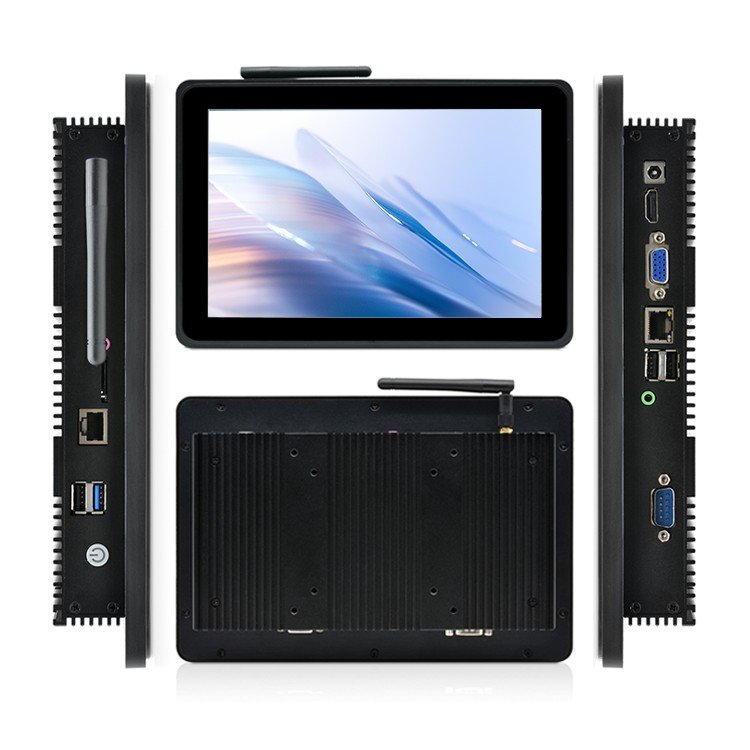
Then close the operational gaps: after a power interruption, does the display return to its last state on its own, or does someone have to walk the aisle? After a defrost cycle, how long before the panel reads correctly at temperature again? And on service — can a technician replace a lite or controller in the aisle with the door on its hinges, or does the door come off, and who does that at 6 a.m. in an open store? If the customer-facing control or diagnostics panel for the case network needs a sealed, panel-mount HMI, that is a separate specification decision from the display lite itself; the 10.1" industrial touch monitor is the kind of building block used for that role when the control surface is specified alongside the door.
Transparent LCD panel vs transparent film: criterion by criterion
| Decision criterion | Transparent LCD panel on the door | Transparent film on existing glass |
|---|---|---|
| Added door mass | Higher: panel stack, bonding, often an added lite. Must be calculated against your hinge rating. | Lower. Usually fits the existing lite without changing hinge class. |
| Glass / lite change required | Often yes — lite count, flatness and bezel clearance may force a new door build. | Usually no, if the existing lite is flat and clean. |
| Image quality and contrast | Higher ceiling; a controlled optical stack can be tuned for case lighting. | Limited by the glass and adhesive; performance drops with reflections and edge peel. |
| Interactivity | Touch-capable configurations are realistic. | Generally display-only. |
| Defog approach and heat | More heat to manage near the lite; needs a designed heater budget. | Less internal heat contribution, but the film surface itself can trap moisture at edges. |
| Who owns the power budget | Display plus defog draw, typically the largest single door load. | Display draw, plus any film or frame heating. |
| Cabling path | Pivot routing with a defined rotation life, or frame loop. | Same routing question, lower conductor count. |
| Serviceability in store | Panel or controller swap; confirm whether the door must come off. | Film re-application; check whether it is an in-aisle job. |
| Warranty responsibility | Split between display supplier and door OEM — get the boundary in writing. | Adhesive and film performance sit with the film supplier; glass with the door OEM. |
On ROI: this page will not quote a payback percentage, an uplift figure or a savings number, because all three depend on your tariff, door count, opening rate and content model. Ask any supplier offering a percentage to show the model behind it — door count in, tariff in, defog duty in, measured content performance in. If they cannot, the percentage is a sales artefact. For the broader commercial context of turning doors into media inventory, the retail media network in-store display readiness checklist covers the content, network and measurement side that sits behind the door.
The proof pack: documents to demand before you sign a rollout
- Datasheet with brightness and contrast measured at stated temperatures, after a stated warm-up, on a stated measurement setup.
- Anti-fog / defog test report naming chamber temperature, relative humidity, door-open protocol and heater duty, with before/after photographic evidence.
- A door-load and panel-stack calculation written against your specific door, including hinge and gasket assessment.
- Pivot-line or hinge-feed life test description, plus the power architecture and brownout/recovery behaviour in writing.
- Service procedure: what a technician replaces, with what tooling, with the door on or off.
- A pilot-door plan for one door in one store climate over a defined period, with agreed measurement points and a documented failure-return path if it fogs.
Three refusal signals should stop a purchase discussion outright: no brightness data labelled with temperature and warm-up conditions; no defog test conditions, only a claimed watt figure; no pivot-line life evidence. Any one of those missing means the supplier is asking you to fund their validation.
Frequently asked questions
How much does a transparent LCD cooler door display add to door weight and hinge load?
There is no universal figure, and a supplier who gives you one is guessing. The number depends on panel size, lite count, bonding and bezel, and on the hinge rating of your specific door. Require a written mass and hinge-load calculation against your door model, confirmed by weighing the assembled door.
How do you stop a digital cooler door from fogging, and what does defog cost in power?
Fog is cleared by keeping the outer lite above the aisle dew point, using frame heating, lite/film heating or airflow and coatings. The power cost is a duty cycle, not a fixed wattage: it varies with store humidity, opening rate, aisle temperature and setpoint. Ask for a duty-cycle test at defined conditions rather than a single claimed figure.
Is transparent LCD better than transparent film for a refrigerated door retrofit?
On an existing door, film is usually the lower-risk fit because it adds less mass and requires less door modification. LCD wins where image quality or touch is the commercial product, or where a new door platform is being designed and the load can be engineered in from the start.
Does a cooler door display stay bright enough in a frozen case?
Only the supplier's temperature-labelled measurement can answer that for their product, at your setpoint, after their stated warm-up. Compare datasheets on that basis, and confirm on a sample door under your case lighting before approving a rollout.
Next step: validate on a sample door, then price the rollout
The decision rule is simple: match the technology to the door you already own, not to the best demo you have seen. If the door cannot carry the mass, seal at the frame, or clear its own fog, no image quality saves the project.
Request a sample cooler door plus a datasheet with measured brightness, power draw and anti-fog test conditions before you quote a rollout. Bring your door model, your store climate and your case setpoint, and we will run the load, hinge and condensation validation against them.
Talk to our engineering team and request a cooler door sample with measured test data — a panel-only sample is also available if your door OEM prefers to mount it on their own test frame.
Equipo de ingeniería de Wintouch
Our commercial-display engineers and product team review specifications against current factory records, deployment requirements and published standards. Learn more about our capacidad de ingeniería y operación de fabricación.
Seguir investigando
Product facts and engineering claims follow our data and editorial policy.
¿Tiene alguna pregunta sobre la instalación?
Comparta el entorno, el tamaño de pantalla y los requisitos de integración con nuestro equipo de ingeniería.